Deploying ThunderID on K8s
How I deployed ThunderID on six AWS instances with Kubernets, Cilium, Istio, and PostgreSQL, including the database bootstrap and the limits of a small Kubernetes lab.
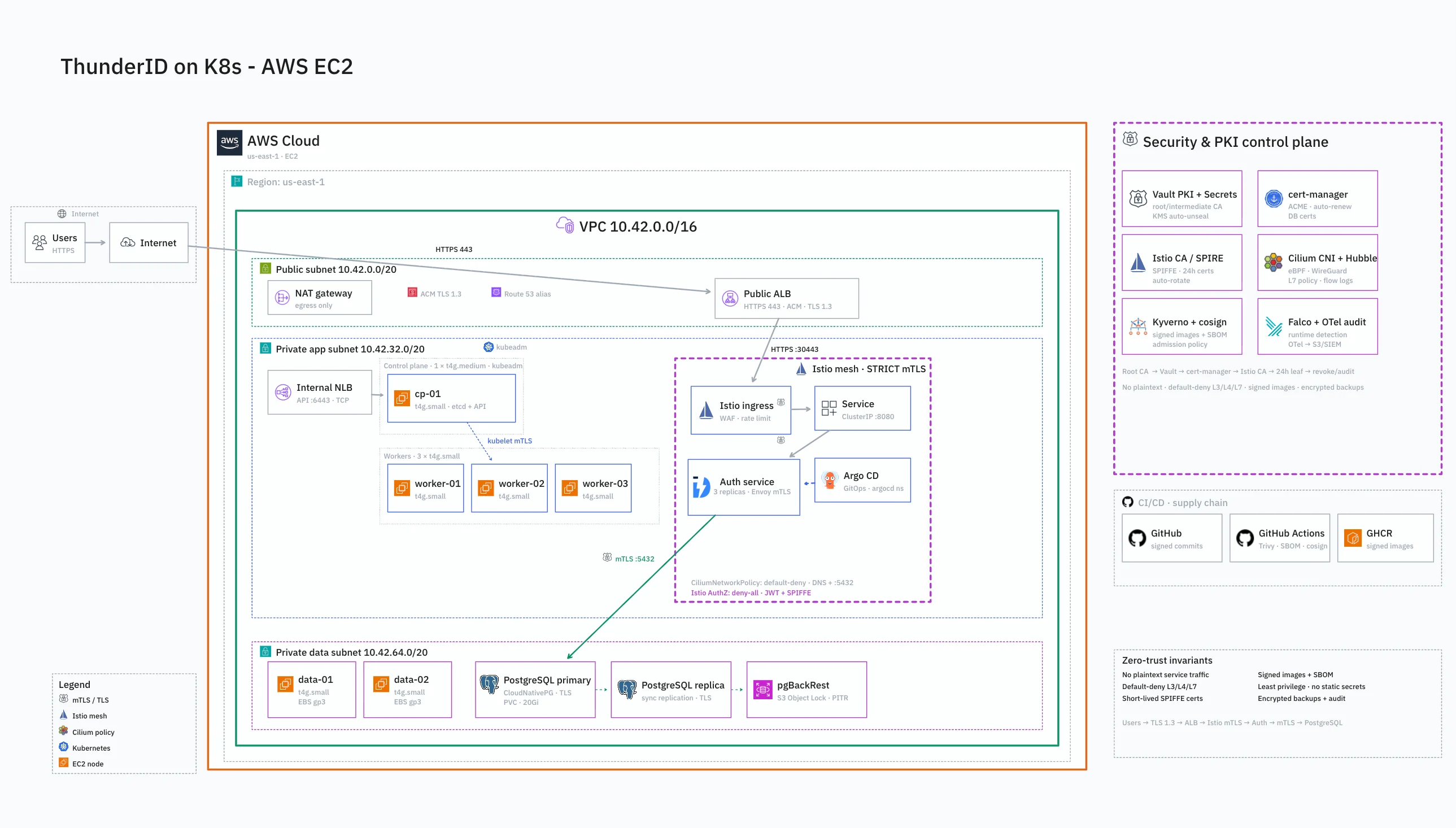
I built the lab on six small AWS instances using Kubernetes, Cilium, Istio, and CloudNativePG. This is a walkthrough of the decisions behind that deployment: how requests reach ThunderID 1.0.1, where the state lives, and which compromises I would revisit before relying on it for real users.
Infrastructure with 6 small nodes
The cluster uses six t4g.small instances across two availability zones. Each has 2 vCPUs and 2 GiB of memory, with a specific role:
- One control plane:
cp-01runs the Kubernetes API server, the other control-plane components, and etcd. - Three workers:
worker-01throughworker-03provide capacity for Istio ingress and ThunderID. - Two data nodes:
data-01anddata-02host the PostgreSQL primary and standby.
At this size, resource requests matter. Sidecars, controllers, and extra replicas all compete for the same small memory budget. I kept ThunderID at one replica and disabled its horizontal pod autoscaler in the lab values.
HTTPS reaches the gateway; mTLS connects the workloads
A browser request passes through the public Application Load Balancer, the Istio ingress gateway, and the ThunderID service. Each connection has its own TLS configuration.
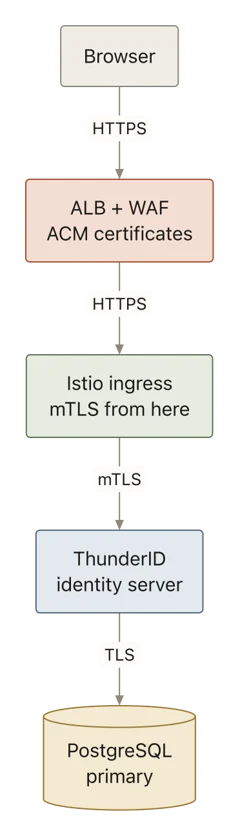
The Application Load Balancer (ALB) presents an AWS Certificate Manager (ACM) certificate to the browser. AWS WAF applies a rate-based rule with a threshold of 2,000 requests per five-minute window per IP.
From there, the ALB opens a separate HTTPS connection to NodePort 30080 on a worker. The gateway presents a self-signed certificate issued by cert-manager. This works because ALB does not validate target certificates. The worker security group restricts that port to traffic from the ALB security group.
cert-manager handles renewal, and Istio loads the gateway certificate through its Secret Discovery Service. Keeping that certificate separate from the public ACM certificate also makes the two termination points explicit.
Inside the mesh, the gateway connects to ThunderID on port 8090 using mTLS. The production namespace requires STRICT peer authentication. A default-deny authorization policy is paired with an allow rule for the ingress gateway's service-account identity to reach ThunderID on that port.
The database connection has another boundary. ThunderID uses sslmode=require, and PostgreSQL sets TLS 1.3 as its minimum version. That requires encryption; it does not establish hostname verification. PostgreSQL distinguishes this from `verify-full`, which also checks the server certificate's hostname.
Private instances, three subnet tiers, one egress dependency
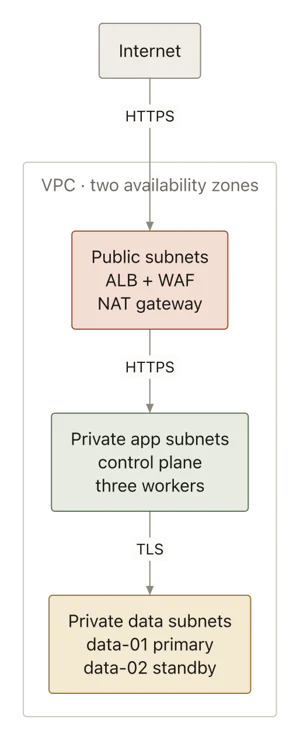
The 10.42.0.0/16 VPC contains public, private application, and private data subnets across two availability zones. The ALB and NAT gateway occupy the public tier. The control plane and workers use the application tier; PostgreSQL uses the data tier.
Every EC2 instance has a private address, with no public IP and no SSH port exposed. I use SSM Session Manager for shell access, so there is no bastion to maintain or SSH key to distribute. Access depends on the caller's IAM permissions, the instance's SSM role, and connectivity to the SSM service.
For this lab, the instances share a role that also carries EBS CSI, KMS, and backup-bucket permissions. That keeps the bootstrap small, but gives the nodes broader permissions than each workload needs. Separating those permissions would be part of hardening the deployment.
One NAT gateway serves the VPC. It keeps the infrastructure smaller, while making outbound access depend on the zone hosting that gateway. Instances in the other zone could remain running and still lose that egress path.
Delegate the authentication subdomain to Route 53
The rest of my DNS stays at Cloudflare (malindhamsara.dev - This domain). For the authentication endpoint, I delegate only a subdomain such as auth.example.com to Route 53 in my case it was auth-test.malindhamsara.dev
Create a public hosted zone for that subdomain, then add its four nameservers as DNS-only NS records for auth in the parent Cloudflare zone. Check the delegation before waiting for the certificate:
dig +short NS auth.example.com @1.1.1.1The Terraform configuration, applied with OpenTofu, creates the ACM validation CNAME and the ALB alias record in that hosted zone. Delegating just this name keeps the change contained. If certificate validation stalls, the delegation is one of the first things to inspect.
The API endpoint name and the route to it are different
The instances run Ubuntu 24.04, with containerd and the Kubernetes packages installed through user data. Once AWS provisioning has completed, kubeadm initializes the control plane using the internal NLB DNS name.
In the command below, replace <API_DNS> with the api_endpoint output which was the Network Load Balancer (NLB) DNS and <CP1_IP> with the private address of cp-01. Run it on the control-plane instance through SSM aws ssm start-session —target<instance-id>:
sudo kubeadm init \
  --control-plane-endpoint "<API_DNS>:6443" \
  --apiserver-advertise-address "<CP1_IP>" \
  --pod-network-cidr=10.244.0.0/16 \
  --service-cidr=10.96.0.0/12
The NLB name becomes part of the API server certificate's identity. My PC reaches the API through an SSM tunnel at 127.0.0.1:16443, while the kubeconfig sets tls-server-name to that NLB name. The connection goes through the tunnel, and certificate verification still uses the expected server name.
In this lab's workflow, workers join through the control plane's private IP and administration uses the tunnel. The NLB is provisioned, but those connections do not exercise its forwarding path because I wanted to keep this small. Keeping that distinction clear prevents a lot of confusion when checking API connectivity.
Cilium replaces kube-proxy in this experiment
The deployment notes record a kernel-specific problem: the iptables NAT backend could not program ClusterIP routing. The workaround is Cilium with kubeProxyReplacement=true, so its eBPF dataplane handles Kubernetes service routing.
The installation script also enables VXLAN tunneling, WireGuard encryption, and Hubble, then removes the kube-proxy DaemonSet.
Service networking needs to work before the application is worth debugging. If a service resolves in DNS but connections fail, I would inspect the dataplane before changing ThunderID's configuration.
Install ingress and storage before the application
After joining the nodes, installing Cilium, and applying the worker and data-node labels, run the platform scripts from the repository root:
bash scripts/install-istio.sh
bash scripts/install-platform.sh
The Istio script installs the base components, control plane, cert-manager, and a gateway exposed through a NodePort service. The ALB already supplies the public entry point, so the gateway does not request another AWS load balancer.
The platform script installs the local-path provisioner and CloudNativePG. The database manifest then requests two PostgreSQL instances, selects nodes labeled role=data, and requires pod anti-affinity to keep the instances on separate nodes. It also configures one synchronous standby.
Storage is deliberately simple: local-path volumes backed by each instance's encrypted gp3 root disk. PostgreSQL replicates between its instances, but the underlying volume remains tied to its node. Kubernetes cannot move that directory to a replacement machine.
The repository includes an EBS CSI gp3 StorageClass for a different storage setup. Using it requires installing the driver and planning the data migration. Neither changing the StorageClass nor adding a standby substitutes for a tested backup and restore process.
Create all four database schemas before running Helm
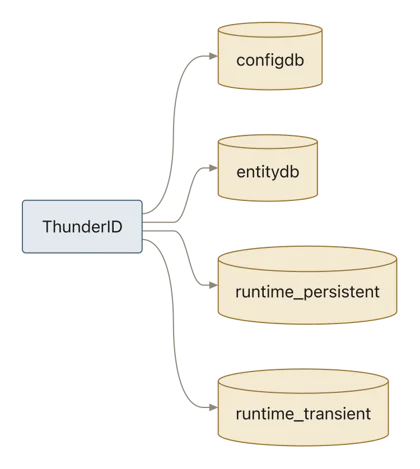
ThunderID 1.0.1 uses configdb, entitydb, runtime_persistent, and runtime_transient. In this deployment, all four live in the same CloudNativePG cluster.
The deployment's bootstrap procedure loads their schemas before installing the chart. This is the dependency I would make most explicit in any automation: a reachable PostgreSQL server is only part of what the application needs.
After creating the production namespace and auth-db-app secret, applying the database manifest, and waiting for auth-db to become ready, the sequence is:
- Create the four databases with
authas their owner. - Start a temporary pod from
ghcr.io/thunder-id/thunderid:1.0.1. - Read each database's
postgres.sqlfrom/opt/thunderid/dbscriptsin that pod and pipe it intopsqlrunning in the PostgreSQL primary. - Check that every schema load succeeded, then remove the temporary pod.
The SQL files come from the same ThunderID image version as the application. The SQL client runs in the PostgreSQL pod. That distinction matters when reproducing the procedure or investigating a failed import.
The repository's database bootstrap section contains the commands. Review every database-creation result: its || true allows the loop to continue after an error, including errors other than an already-existing database.
With the schemas loaded and manifests/values/thunderid.yaml configured for your domain and database, install the pinned chart version:
helm upgrade --install thunderid \
  oci://ghcr.io/thunder-id/helm-charts/thunderid \
  --version 1.0.1 \
  -n production \
  -f manifests/values/thunderid.yaml \
  --wait --timeout 12m
The setup Job handles ThunderID's initial configuration, signing keys, and admin credentials. The generated admin password is stored in the thunderid-admin-credentials secret.
Finally